[CHARTERING · VOYAGE ESTIMATION
]
Which ship should take this cargo?
One ship is closer to the load port. Another gives you more room on the dates. Shipnet lets chartering teams compare open vessels against the same cargo order, using the voyage schedule operations works from.
Shipnet's new web-based commercial and accounting platform

Compare the ships before you fix
From planning to final reporting, every stage of the voyage flows through one connected system.
Start with the broker’s email
Shipnet’s AI Inbox pulls cargo details from the email and its attachments. Check them against the original message, then open a Quick Estimate using the latest vessel positions and expected opening dates.
See which ships make the laycan
Run the same cargo against your open ships. Compare the expected net result, time charter equivalent (TCE), laycan fit and estimated CO₂ side by side.
Carry the fixed estimate into the voyage
Build out the estimate with laytime terms, the bunker plan and applicable EU ETS and FuelEU costs. Once you fix, operations takes over the voyage with the figures it was fixed on.
Let's take a look at an example ...
Five open ships.
Four make the laycan.
One ship would arrive most of a day late. For the vessel the charterer selected, Quick Estimate showed USD 37,119 per day.
The detailed estimate came to USD 33,606 per day after adding carbon costs and cargo expenses.
That was the figure the voyage was fixed on.
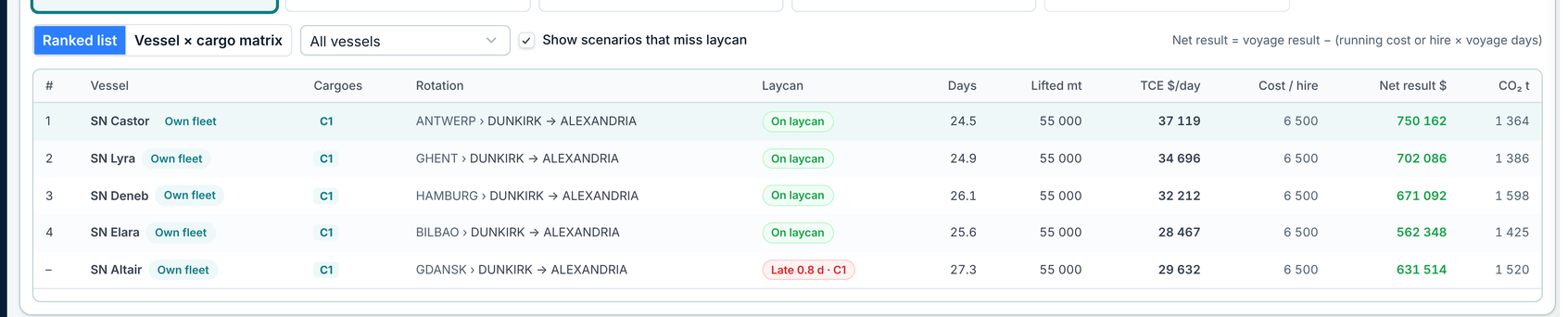
One cargo, five open ships, compared on the same terms.
Bring a cargo you’d price against more than one ship
Bring a dry bulk or tanker example to a session with a Shipnet product specialist.
We’ll show how the broker’s order becomes an estimate, how the vessel options compare and what carries through when you fix.
Tanker orders quoted in Worldscale can go through the same workflow.
How Shipnet supports your role
When information flows across the organisation, decision-making becomes simpler.
[Commercial teams]
Plan and monitor voyages with operational and financial data aligned in real time.
[Finance teams]
Reduce reconciliation effort through accounting built around fleet activity.
[Executives]
Gain a clear, organisation-wide view of operational performance and profitability.
[Commercial teams]
Plan and monitor voyages with operational and financial data aligned in real time.
[Finance teams]
Reduce reconciliation
effort through
accounting built around fleet activity.
Some of our customers





150+ Customers
30+ Years in maritime software
31 Countries
150+
Customers
30+ Years
in maritime software
31
Countries
See Shipnet in your operation
Understand how an integrated maritime
ERP platform fits your fleet -
based on how you actually work.
Talk through your setup
See Shipnet in your operation
Understand how an integrated maritime ERP platform fits your fleet - based on how you actually work.
Talk through your setup